Connect Razorpay in One Click: No API Keys Needed
Insidemetics now connects to Razorpay with one button: log in to Razorpay, click Allow, and start selling. No API keys to copy, no webhook to set up.
PParth Garg· Founder, Insidemetics · Updated · 3 min read
In short
- Click Connect with Razorpay, log in to Razorpay, click Allow. Your buy buttons go live.
- No API keys to copy and no webhook to add: payments confirm automatically.
- You log in on Razorpay's own page, so we never see your Razorpay password.
- Disconnect any time from Insidemetics or from your Razorpay dashboard.
Until now, connecting Razorpay meant generating API keys, copying a Key ID and a Key Secret, and adding a webhook in Razorpay's settings. It worked, but it was the step where most new stores got stuck. Now it's one button.
How it works
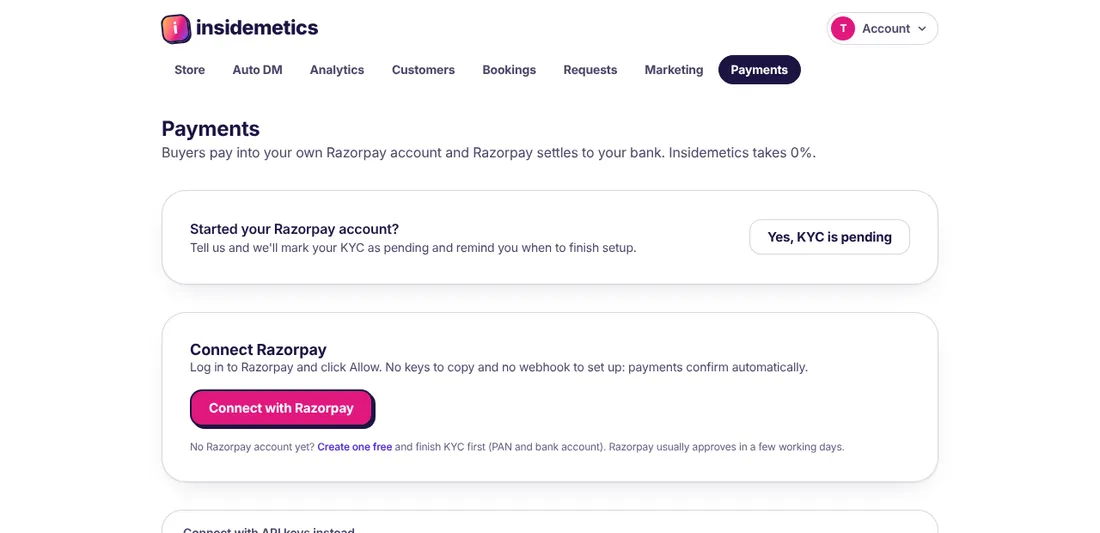
- Open Payments in your Insidemetics dashboard.
- Click Connect with Razorpay.
- Log in to Razorpay on Razorpay's own page and click Allow.
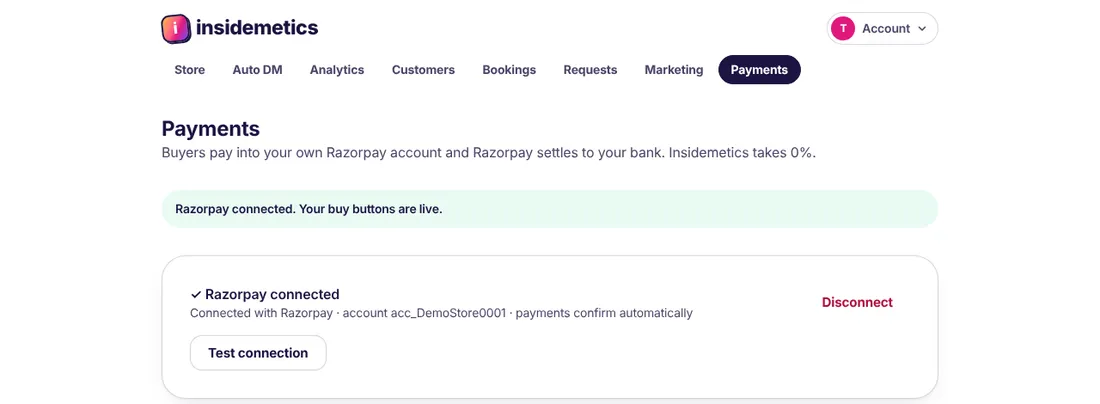
- You're back on Insidemetics with Razorpay connected. Add a product and share your link.
Why it's safer
- You never paste a secret key anywhere. Insidemetics gets permission from Razorpay, not a copy of your keys.
- You log in on Razorpay's own page, so your Razorpay password stays with Razorpay.
- Access can be removed any time: click Disconnect on Payments, or remove Insidemetics in your Razorpay dashboard. Your store stops taking payments until you connect again.
- Money still goes straight to your own Razorpay account and settles to your bank. Insidemetics takes 0% of your sales.
Already connected with API keys?
Nothing changes unless you want it to. Your keys keep working. On the Payments page you'll see Switch to Connect with Razorpay; click it and your keys are replaced once the new connection is made, and you no longer need the webhook you set up.
Before you connect
You need a Razorpay account with KYC done: PAN, bank account and, for businesses, business proof. Razorpay usually approves accounts in a few working days. While you wait, free downloads work without Razorpay, so you can start collecting emails straight away.
Frequently asked questions
Do I still need Razorpay API keys?
No. Connect with Razorpay replaces them, so there are no keys to copy.
Do I need to set up a webhook in Razorpay?
No. With Connect with Razorpay, payments are confirmed automatically, even if a buyer closes the tab before the page loads.
Can Insidemetics take money from my Razorpay account?
No. Insidemetics uses the connection to create orders, confirm payments and process refunds you ask for on your store. Settlements go from Razorpay to your bank as usual.
How do I disconnect?
Click Disconnect on the Payments page, or remove Insidemetics from your Razorpay dashboard. Either way your store stops taking payments until you connect again.
Parth Garg · Founder, Insidemetics
Parth is building Insidemetics, a link-in-bio creator store where buyers pay straight into the creator's own PayPal or Razorpay account and the platform takes 0% of sales. He writes these guides from what he learns building checkout, delivery and billing for creators.