Auto-Reply to Instagram Comments with a Link (Comment to DM)
Set up "comment GUIDE and I'll DM you the link" on your reels: how comment-to-DM works, Instagram's rules for it, and a step-by-step setup with Insidemetics Auto DM.
PParth Garg· Founder, Insidemetics · Updated · 3 min read
In short
- Comment-to-DM sends your link privately to everyone who comments a keyword.
- Instagram allows one private reply per comment, within 7 days, from professional accounts.
- Say exactly what people get and which word to comment, in the reel and the caption.
- Test from a second account before you post, then watch taps and sales per automation.
A link typed into a caption can't be tapped, and "link in bio" loses people on the way. Comment-to-DM fixes that: followers comment a word like GUIDE, and your account replies in their DMs with a button to the exact page. Here's how it works and how to set it up.
What Instagram allows
Automated comment replies use what Meta calls private replies. The rules, from Meta's developer documentation:
- One private message per comment.
- It must be sent within 7 days of the comment.
- Only Instagram professional accounts (Business or Creator) can send them.
- Follow-up messages are only allowed once the person replies, and within 24 hours of their reply.
Step 1: Switch to a professional account
In Instagram, open Settings, then Account type and tools, and switch to a Creator or Business account. It's free, and your followers and posts stay as they are.
Step 2: Connect Instagram
In your Insidemetics dashboard, open Auto DM and tap Connect Instagram. You log in on Instagram's own page and approve access to your comments and messages; Insidemetics never sees your password.
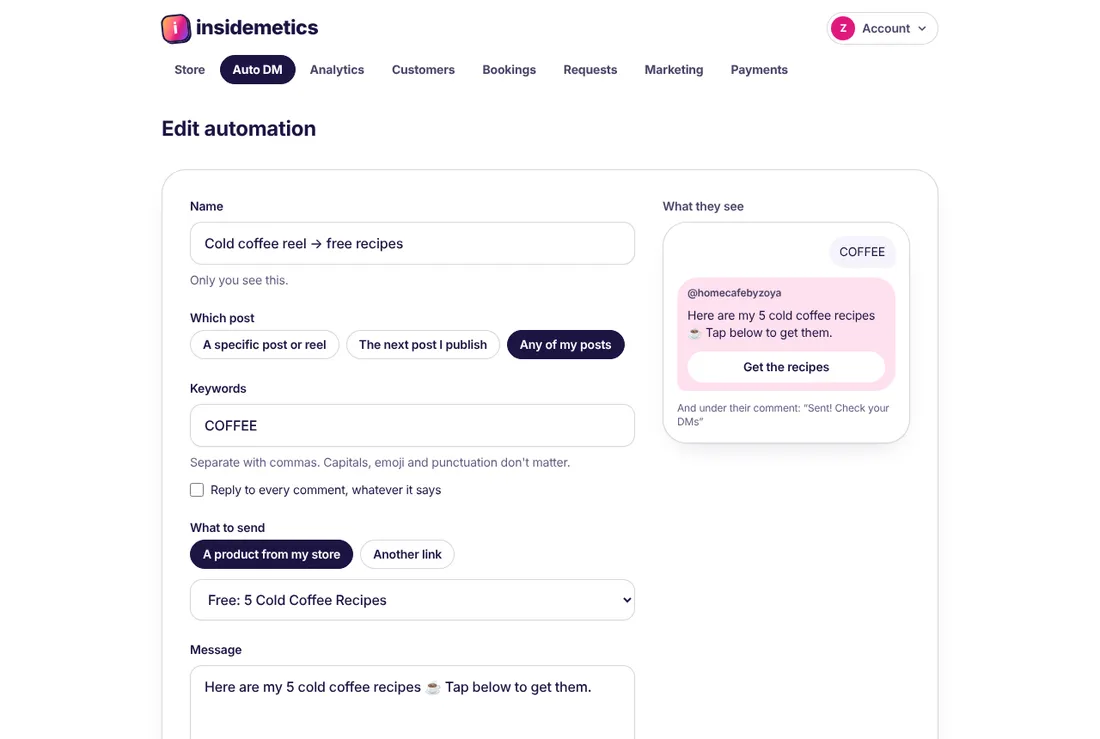
Step 3: Create the automation
- Pick the post or reel. On Pro and Business you can also choose "the next post I publish" or "any of my posts".
- Enter the keyword. Capitals, emoji and punctuation don't matter, so "guide!!" and "Guide 🙏" both match GUIDE.
- Choose what to send: a product from your store, or any link.
- Write a one- or two-line message and the button text, such as "Get the guide".
- Keep the public reply on, so others see that commenting works.
Step 4: Write the call to action
Say it in the reel and repeat it in the first line of the caption: what they get, and the exact word. "Comment GUIDE and I'll DM you my 7-day meal prep plan" works better than "comment below for the link", because people know what they're asking for.
Step 5: Test before you post
Comment the keyword from a second account. Within a few seconds you should see the DM with its button, and the public reply under the comment. Tap the button to check the page it opens.
Optional: followers only, or email first
| Setting | What happens | Good for |
|---|---|---|
| Followers only | They tap a button first; non-followers are asked to follow before getting the link | Growing followers from a viral reel |
| Ask for email | They reply with their email before getting the link, and land in your Customers list | Building a list before a launch |
| Neither | The link arrives straight away | Sales: fewest steps to the checkout |
Measure what it sells
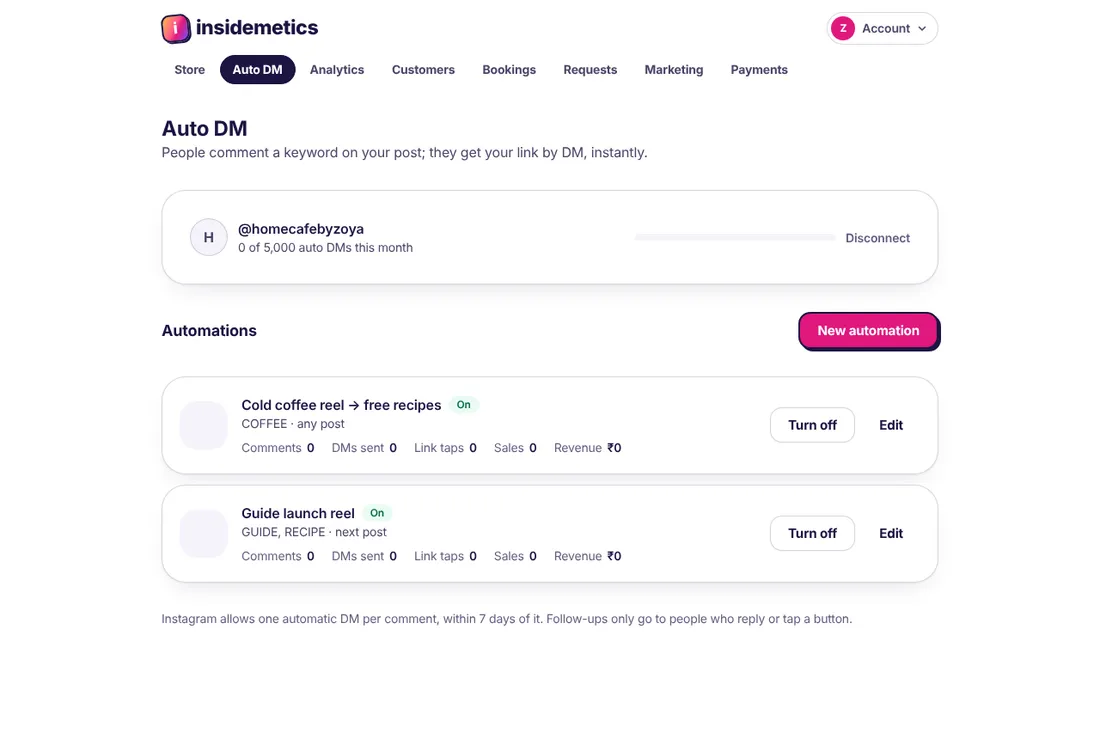
Each automation shows comments matched, DMs sent, link taps and sales. Visits from Auto DM are tagged as Instagram in your store analytics, so you can see which reels actually sell.
Frequently asked questions
Can I reply to every comment, not just a keyword?
Yes. Tick "Reply to every comment, whatever it says" when you create the automation.
Does it work on old posts?
Yes, on any post or reel you pick. Instagram only allows a private reply within 7 days of each comment, so it answers new comments.
How many DMs can I send?
As many as you need: auto DMs are unlimited on every plan.
Parth Garg · Founder, Insidemetics
Parth is building Insidemetics, a link-in-bio creator store where buyers pay straight into the creator's own PayPal or Razorpay account and the platform takes 0% of sales. He writes these guides from what he learns building checkout, delivery and billing for creators.
Sources (checked October 2026)